> For the complete documentation index, see [llms.txt](https://wiki.fbi.company/llms.txt). Markdown versions of documentation pages are available by appending `.md` to page URLs; this page is available as [Markdown](https://wiki.fbi.company/ios-pian/shadowrocket.md).
# Shadowrocket
## 前期准备
### Shadowrocket是一款基于规则的网络调试工具,具有性能高和稳定好、使用流畅,功能多样的特点,只占用最少的系统资源,全盘接管所有的连接,根据规则来进行处理,让你无忧无虑。独有的场景模式,方便根据不同需求自动切换配置及节点。
### 由于App Store中国区禁止上架VPN类所有软件,所以该软件仅在美区、港区等非国区App Store可下载,并且该软件是收费软件,为开发者收取。目前提供下面两种获取Shadowrocket的方式
## ①自购软件
### 需要一个非国区的 Apple ID 账号 [注册教程](/ios-pian/gao-jie-shi-yong-fang-fa.md)
### 使用兑换码充值 [教程](https://support.apple.com/zh-cn/HT201209) 充值卡可以从某宝、某多处购买。
### 注意:充值卡的区域最好与 Apple ID 账号所在区域一致

## ②站内共享
* [x] 获取账号密码
G%5BVS%7DFVS%5B5TBCLUJ%5D90.png?alt=media&token=8fb27fb3-0c67-4a97-b8c1-86ffc1b6d8e9) ### 在站内首页左下角找到站内共享的Apple ID共享页获取第三方共享Apple ID的账号密码
### 在站内首页左下角找到站内共享的Apple ID共享页获取第三方共享Apple ID的账号密码
 * [x] 登录第三方共享Apple ID
 ### 打开手机桌面上的 App Store ->点击右上角头像,拖动到最底部退出自己的账户
### 成功退出后,输入我们提供的ID和密码,点击登入
### 弹出“Apple ID安全”页面后 点击"其他选项" -> 点击"不升级"
### 登录成功后 App Store 会切换对应的语言,在搜索框输入 `Shadowrocket` 进行安装
### 安装完成可正常打开app后 打开手机App Store 退出共享账号,安装完成后不再需要Appe ID,所以请不要保留在手机登录。
{% hint style="danger" %}
### 千万不要在 `设置` 内登录共享的APPLE ID账户。
{% endhint %}
##
## 导入节点
### 进入网站首页,点击 `Shadowrocket订阅,`点击后会提示打开第三方应用,允许后软件会自动处理.

### 如果失败请使用Safari重试,依然失败请点击`复制V2Ray订阅链接`,打开软件点击+号,类型选择Subscribe,将复制的链接粘贴进URL里,点击完成即可导入.
##
## 订阅更新设置
### 在设置-服务器订阅内开启打开时更新,也可开启自动后台更新以确保可以自动获取最新节点信息。检查最大值是否为0,如果不是0可能导致部分节点丢失。

##
## 开始使用
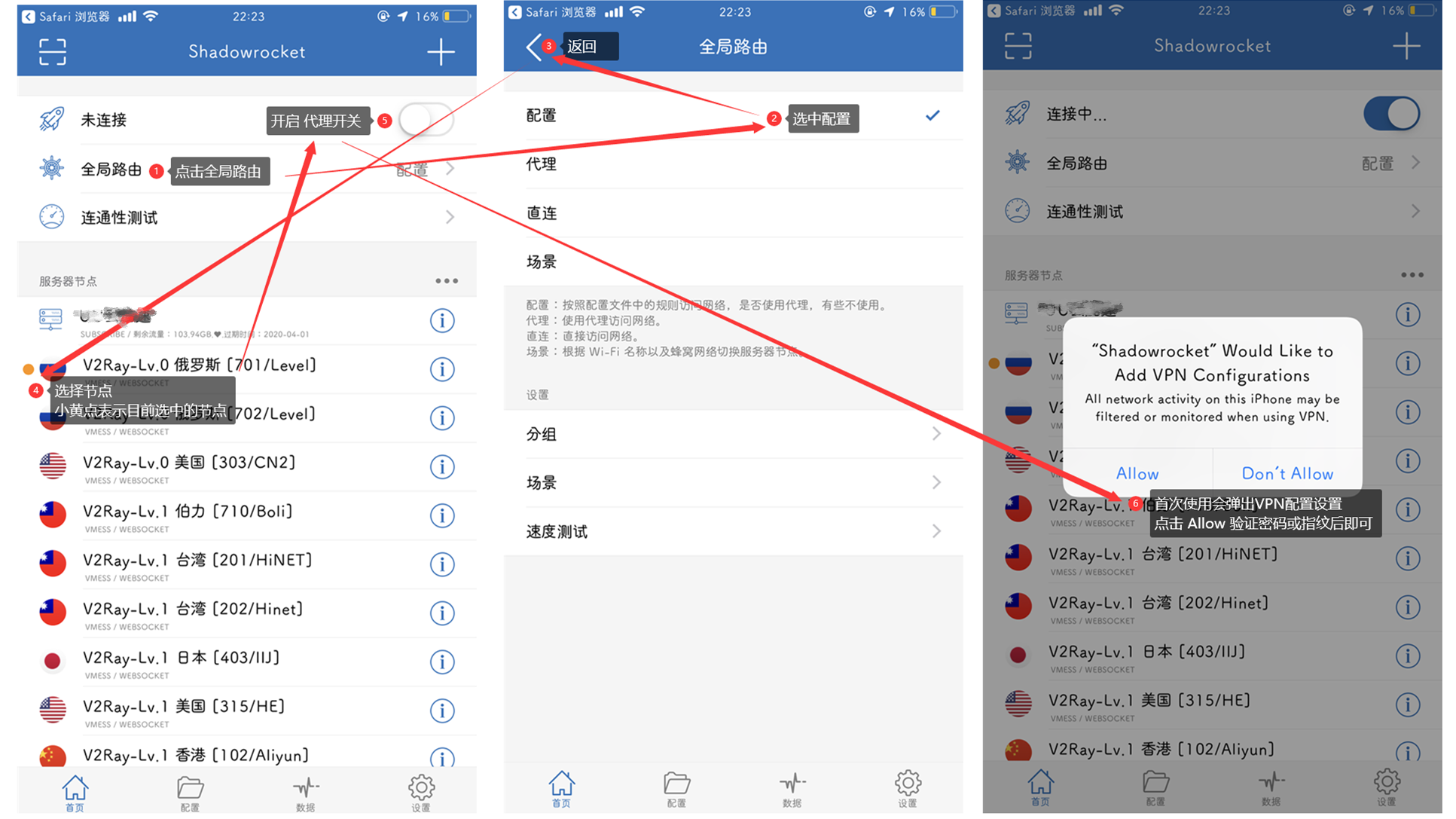
### `回到首页`,点击进入`全局路由`将其更改为 `配置`
### 在节点列表中选择节点,小黄点表示当前选择的节点
### 点击最顶上的开关开启代理
### 如果是首次开启会弹出VPN文件的应用,务必点击`Allow`并验证
### 打开手机桌面上的 App Store ->点击右上角头像,拖动到最底部退出自己的账户
### 成功退出后,输入我们提供的ID和密码,点击登入
### 弹出“Apple ID安全”页面后 点击"其他选项" -> 点击"不升级"
### 登录成功后 App Store 会切换对应的语言,在搜索框输入 `Shadowrocket` 进行安装
### 安装完成可正常打开app后 打开手机App Store 退出共享账号,安装完成后不再需要Appe ID,所以请不要保留在手机登录。
{% hint style="danger" %}
### 千万不要在 `设置` 内登录共享的APPLE ID账户。
{% endhint %}
##
## 导入节点
### 进入网站首页,点击 `Shadowrocket订阅,`点击后会提示打开第三方应用,允许后软件会自动处理.

### 如果失败请使用Safari重试,依然失败请点击`复制V2Ray订阅链接`,打开软件点击+号,类型选择Subscribe,将复制的链接粘贴进URL里,点击完成即可导入.
##
## 订阅更新设置
### 在设置-服务器订阅内开启打开时更新,也可开启自动后台更新以确保可以自动获取最新节点信息。检查最大值是否为0,如果不是0可能导致部分节点丢失。

##
## 开始使用
### `回到首页`,点击进入`全局路由`将其更改为 `配置`
### 在节点列表中选择节点,小黄点表示当前选择的节点
### 点击最顶上的开关开启代理
### 如果是首次开启会弹出VPN文件的应用,务必点击`Allow`并验证
 {% hint style="warning" %}
#### 其他问题请查看下方的常见问题解答
{% endhint %}
{% hint style="warning" %}
#### 其他问题请查看下方的常见问题解答
{% endhint %}